Your supplier has imported the customer database into a new system. The progress bar is complete, and the record count looks right. Is it safe for the team to start using it?
Approve the switch only when you have evidence that the expected records arrived, their important details and relationships survived, and staff can complete the work those records support. Agree those checks before the final import, alongside a recovery plan that accounts for any work entered after the switch.
This guide is for a founder or business owner moving structured records from spreadsheets, a CRM, or an older application into a replacement business system. It provides a fictional reconciliation example and a reusable acceptance worksheet. It does not prescribe a particular migration platform or cover the full requirements of moving accounting ledgers, mailboxes, or regulated records.
Define what must arrive before counting it
Start with an inventory by record type: customers, contacts, projects, tasks, notes, and attachments. For each type, identify who owns it, what moves, what stays accessible elsewhere, and how you will verify the result. Treat attachments and their links as a separate item; a migrated filename does not demonstrate that the file opens.
Write the boundary in ordinary language. For example: “Move all genuine customer accounts and all open projects as of the agreed cutoff. Keep closed project history in a searchable archive.” Name the person who approves exclusions. An import error must not quietly become an exclusion just to make the totals balance.
Define what one record means. A file may contain several rows for one customer because each row describes a different relationship. HubSpot’s import documentation, for example, describes repeating a record across rows to associate it with multiple records. Counting spreadsheet lines can therefore answer a different question from counting customers.
Use a dated export or another consistent snapshot: a view of the source at an agreed point in time. Comparing yesterday’s source export with a target that includes today’s new work creates differences that may be timing issues rather than migration errors. Record the cutoff with its time zone and the filters used on both sides.
Agree how identities, fields, and relationships change
A record ID is a stable label for a record, such as C-140. It is more useful for reconciliation than a company name that people can edit. Ask for an ID mapping that connects each source record to its destination, including the records deliberately merged together.
If the destination assigns new IDs, preserve the old ID in a suitable field or a separate mapping file. Do not assume an old system’s ID belongs in the new system’s own ID column. HubSpot’s requirements for updating records illustrate why this matters: imports use specified unique identifiers to recognize existing records and avoid creating duplicates. The identifier and matching rules depend on the destination.
Create a short field map with the person who uses the data:
| Source information | Destination rule | Evidence to request |
|---|---|---|
| Customer ID | Preserve or map to the new ID | Every retained customer has one intended destination |
| Customer status | Map each old value to an agreed new value | A comparison by ID, with unrecognized values listed |
| Project’s customer | Translate the customer ID through the approved mapping | Each project belongs to the intended customer |
| Due date | Preserve the intended calendar date | Tests with ambiguous dates such as 04/05 and month boundaries |
| Optional phone number | Define whether blank means absent, unchanged, or cleared | A test of both new records and updates |
Blank values deserve an explicit rule. In HubSpot, a blank import cell does not clear an existing property value; the blank-cell guidance documents that behavior. Check your destination’s behavior instead of assuming that a blank source field will erase an old value.
For merged customers, decide which values survive and where their projects, notes, and files attach. “Remove duplicates” is incomplete if two records disagree about the contact person or one has an open project. Keep the original export and a record of the approved merge decisions so you can explain the transformation later.
Work through a migration that passes the count check
Imagine a fictional maintenance consultancy replacing a spreadsheet-based customer and project tracker with a web application. These numbers are illustrative assumptions, not a Techsouq client result or a benchmark.
Assume the destination starts empty. The rehearsal uses a fixed source snapshot with no concurrent edits. Each source customer row represents one account record, and each project row represents one project. All 86 open projects must move; each has exactly one customer, and none belongs to an excluded test account.
The business approves removing 12 test customer records and merging duplicate accounts. The merges absorb 18 additional rows into retained customer records. That means 18 rows removed, not 18 duplicate groups. For example, merging three rows into one removes two rows. The 12 test records and 18 absorbed rows are separate sets.
| Customer reconciliation | Records | Meaning |
|---|---|---|
| Source snapshot | 1,240 | All customer rows before cleanup |
| Approved test records excluded | −12 | Listed by source ID and reason |
| Additional duplicate rows absorbed | −18 | Mapped to their retained customer |
| Expected destination customers | 1,210 | 1,240 − 12 − 18 |
| Actual destination customers | 1,210 | Counted after the rehearsal import |
| Count difference | 0 | Actual − expected |
The open-project count also matches: 86 expected, 86 present. The identity comparison finds every expected customer and project, with no unexpected records. Agreed customer fields match. Yet the project relationship check finds this:
| Check for project P-041 | Value | Interpretation |
|---|---|---|
| Source customer | C-140 | The account this project belongs to |
| Approved customer mapping | C-140 → T-882 | Its customer in the new application |
| Imported project’s customer | T-019 | A different, valid customer |
| Expected result after correction | P-041 → T-882 | The relationship that must be restored |
All 86 projects exist, but only 85 have the correct customer relationship. The wrong customer also exists, so a check that merely asks “does this customer ID exist?” will pass. Staff could open a complete-looking project under the wrong account.
The decision is to hold the switch. Correct the mapping, rerun the affected import safely, and repeat the relationship comparison across all 86 projects. Recheck counts and identities too: a repair that creates another copy of P-041 introduces a new problem. For this example, acceptance requires 86 correct project-to-customer links and no unresolved identity or required-field discrepancies.
The count formula applies to this empty-target, one-record-per-row example. If you are updating an existing destination, splitting one source record into several, or importing relationship rows, agree a different reconciliation model. Do not subtract failed imports from the expected total: they remain missing until resolved or explicitly reconsidered by the business owner.
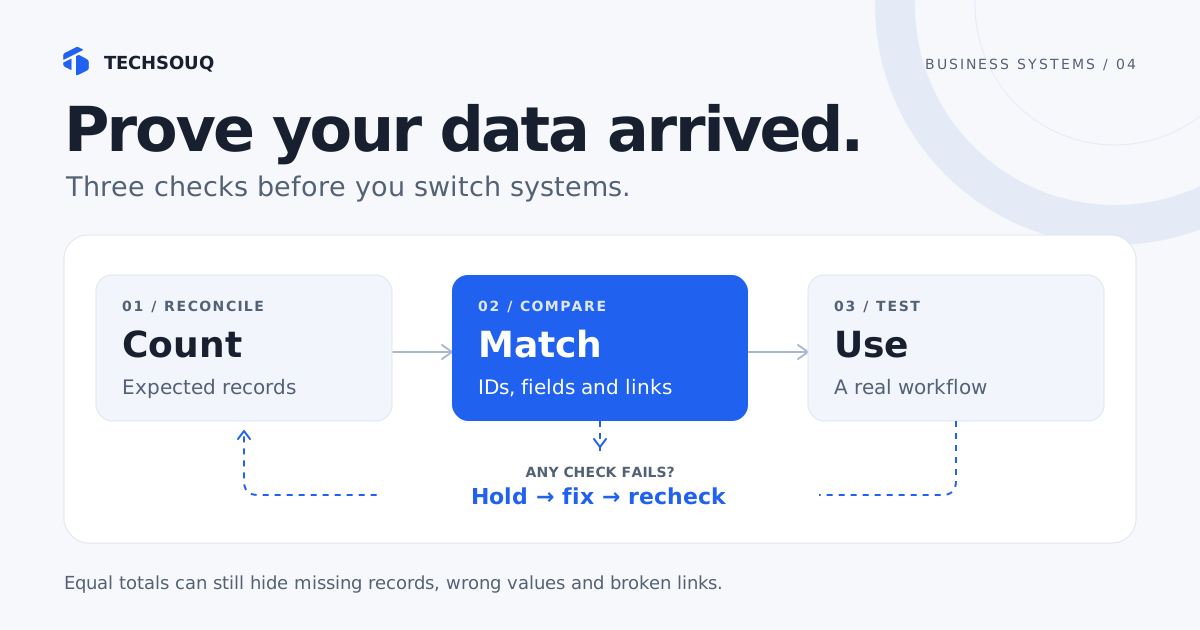
Ask for evidence at three levels
Use the same cutoff, scope, and approved transformation rules for each level. Ask the supplier to keep a report you can review, rather than only a screenshot saying the import completed.
- Counts and identities. Compare expected and actual records by type. List missing IDs, unexpected IDs, unapproved duplicate destination records or ambiguous matches, and source records without a mapping. Equal counts can hide one missing record and one extra record.
- Values and relationships. Compare the important fields after applying the agreed transformations. Check the actual parent assigned to each child record, not just whether a parent exists. Report mismatches and records that could not be checked separately.
- Real work. Have staff find a known customer, open the right project, review its history, make an authorized change, and see the result in the relevant report or integration. Include an awkward case, such as a customer produced by a merge.
AWS Database Migration Service provides a useful concrete distinction: its data validation compares corresponding source and destination rows and reports mismatches. Its statistics also distinguish records awaiting validation from records it cannot validate. A zero failure count with checks still pending is incomplete evidence. These are capabilities and states of AWS DMS, not a promise that every CRM import tool provides equivalent checks.
For data available as exports, ask your supplier to automate complete comparisons of identities and critical fields where practical. Use human review to assess meaning and usability. A sample can expose problems, but passing a handful of records does not establish that every record is correct. If a platform prevents complete comparison, document what was checked, what was sampled, and what remains uncertain.
Microsoft’s Dynamics 365 go-live checklist recommends testing with migrated data and the users’ correct security roles. Apply that principle to your business tasks: a test performed only as an administrator may miss a staff member’s inability to see or update the right project. For a customer-facing system, also check the account-access boundaries described in our customer portal scope guide.
Rehearse the switch and the return path
Cutover is the point when the new system becomes the place where people do their work. Rehearse the sequence using representative data and record the time spent exporting, importing, validating, and correcting problems. Include validation in the available window instead of budgeting time only for moving records.
Microsoft’s cutover guidance calls for task owners, verification steps, a rollback plan, and rehearsals. For the consultancy, the business owner makes the final decision, the supplier runs the migration and comparisons, and an operations lead checks the project workflow. Assign actual names and backups in your own plan.
Agree how changes stop or catch up. A staff announcement alone does not pause a website form, scheduled import, or connected application. List every source of writes and decide who pauses it, preserves any queued work, and restarts it in the correct system. If operations cannot pause, ask for a tested synchronization approach and a final consistency checkpoint; the simple fixed-snapshot example is insufficient.
AWS’s cutover guidance describes freezing new input, taking a final backup, synchronizing data, switching traffic, and validating the result. It also distinguishes rollback before new data is written from rollback after the new system has accepted changes. Returning to an old copy after staff have created new projects can lose that work unless it is recovered and reconciled.
For the consultancy, define a decision deadline while there is still time to use the rehearsed return path. A wrong customer relationship blocks the switch. If a problem appears after staff begin entering work, the recovery owner first accounts for those new records and edits, then decides whether to repair the new system or return to the old one. “We have a backup” does not answer how today’s changes will survive.
Use this acceptance worksheet with your supplier
Copy the worksheet into your project document or download the plain-text acceptance worksheet. It is a manual record of evidence and decisions, not an automated validator. It works without JavaScript and does not require uploading customer information to this page.
For each row, add a named owner, evidence location, result, unresolved issue, and decision date. Use pass, fail, or not checked; an empty result must not imply approval.
| Acceptance area | Evidence to attach | Decision to record |
|---|---|---|
| Scope and snapshot | Record inventory, cutoff with time zone, inclusion filters | Do both sides describe the same population? |
| Exclusions and merges | Source IDs, reasons, approvals, survivor mappings | Can every removed row be explained? |
| Reconciliation | Expected/actual counts, missing/extra IDs, unapproved duplicates | Are all required records accounted for? |
| Fields and relationships | Comparison results, transformation rules, unverified records | Do values and links meet the agreed rules? |
| Files and business tasks | File-open checks and workflow results under normal roles | Can the team do the required work? |
| Cutover and recovery | Rehearsal log, write controls, tested restore or return path | Can we switch or recover within our agreed window? |
| Decision and support | Named approver, remaining issues, support owner | Proceed, hold, or recover—and who acts next? |
Agree blockers before launch pressure makes them negotiable. In this example, missing required customers, incorrect project ownership, and an untested return path block approval. A nonessential historical label might be deferred with an owner and an agreed resolution date. That is a business decision about a specific defect, not a universal percentage of acceptable errors.
After switching, check the first real creation, update, and integration cycle. Confirm that paused work resumes once, in the intended system. Keep evidence and an accessible source reference for the agreed support period; decide access, retention, and eventual removal with the responsible business owner rather than copying an arbitrary number of days.
Bring the inventory and worksheet to your supplier before accepting a migration estimate. Ask: “Which of these checks are included, what evidence will you deliver, and what happens if they fail?” Include that work in your software cost comparison. If the move involves a custom application or integration, Techsouq’s business systems services can help turn those acceptance conditions into implementation scope.
Sources and further reading
- HubSpot: Format import files — identifier, association, and blank-value behavior in HubSpot imports.
- AWS DMS: Data validation — row comparison and distinct validation states.
- Microsoft: Go-live checklist — tests using migrated data and appropriate user roles.
- Microsoft: Cutover strategy — ownership, verification, rehearsal, and approval.
- AWS: Cutover stage — final synchronization and recovery after new writes.
Sources checked on 21 October 2026. Product documentation supports the specific behaviors cited; the consultancy, counts, ID mapping, acceptance conditions, and worksheet are original illustrative planning examples. They do not establish that a particular migration is complete or correct.