“We need a customer portal” can describe anything from a page of invoices to an entire operating system for a service business. That is why two suppliers can hear the same request and return completely different prices.
A useful first release starts with a specific customer task and follows it through to a reliable outcome. This guide works through one example: a client reviews a deliverable, approves it or asks for changes, and both sides can see what happened. Then you can adapt the brief builder to your own workflow.
The example is fictional. Its purpose is to make scope decisions concrete, not prescribe the right portal for every business.
Start with the moment that keeps turning into an email
Imagine a design consultancy managing 25 active client accounts. Deliverables are already stored in a shared document system. Project managers email links, chase replies, and copy decisions into a project tracker. Clients sometimes approve an older attachment, and staff cannot always tell whether “looks good” came from the person authorized to sign off.
The first-release goal is:
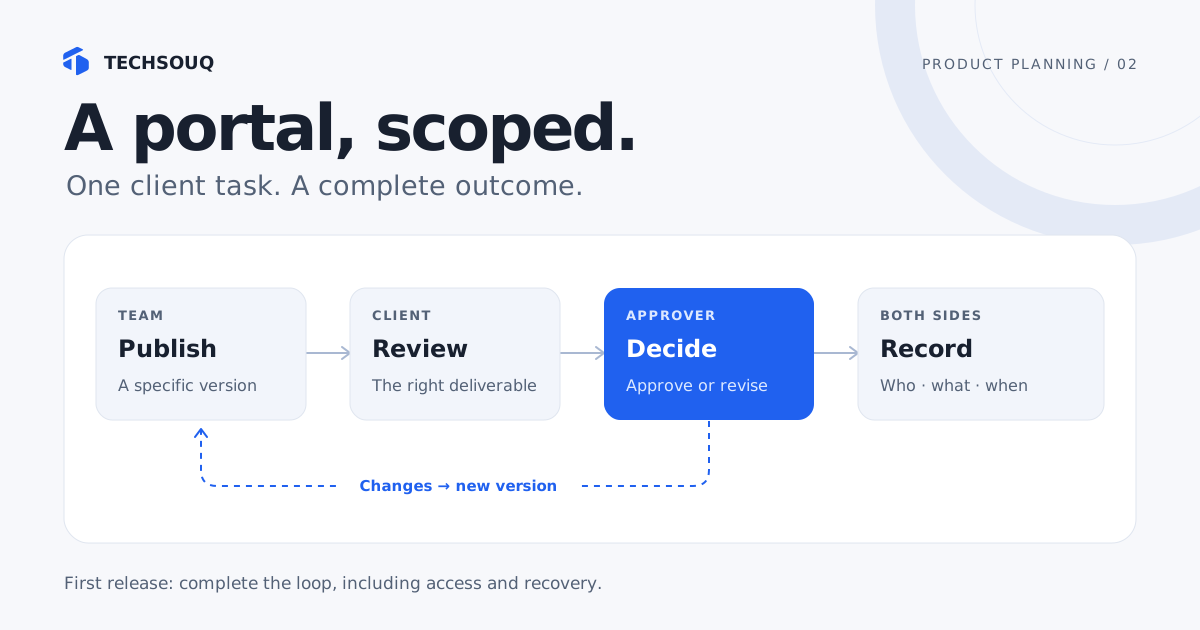
An invited client approver can review the current deliverable, approve that exact version or request a change, and receive a confirmation that the project manager can also see.
That sentence establishes the user, action, object, and outcome. It also exposes decisions hidden inside the word “portal.” Who may approve? What makes a version current? What if the approver changes? What happens to the original decision when a new version is published?
Before designing screens, inspect a small batch of completed projects and talk to the people on both sides of those emails. Measure active handling time and count incidents such as “wrong version approved.” Check whether clients actually need another place to log in or whether a clearer approval flow in an existing tool would solve the problem.
GOV.UK’s alpha guidance recommends testing the riskiest assumptions with prototypes. Here, a prototype can test whether clients understand what they are approving; a separate technical experiment can test access to the document system. Neither requires building the entire portal first.
Draw the complete approval loop
The first release needs one successful loop, including the staff work around it:
- A project manager publishes a deliverable to the correct client account and marks the version ready for review.
- The client receives a notification and follows a link through the agreed access flow.
- The portal identifies the project, deliverable, version, and permitted action.
- The authorized approver approves that version or requests changes with a comment.
- Both sides see a confirmation, the updated state, and the recorded decision.
- If changes are needed, staff publish a new version and the next review begins.
Publishing a new version must not silently turn an earlier approval into approval of the replacement. Preserve the relationship between a decision and the version it concerned. This is a business rule the team must agree before anyone estimates an “approve” button.
Likewise, a successful email send is not evidence that the client completed the task. Record the decision in the system; use email to direct attention to it. Give the project manager a way to notice unresolved reviews without searching an inbox.
Decide who can do what
For this example, use three roles. The table is a starting point for discussion with the business owner, not a universal permission model.
| Role | Can view | Can act | Must not be able to do |
|---|---|---|---|
| Client reviewer | Assigned deliverables for their account | Leave review comments | Approve on behalf of the client |
| Client approver | Assigned deliverables for their account | Approve or request changes | Access another client’s records |
| Internal project manager | Client accounts they manage | Publish versions, invite users, follow up | Silently rewrite a client’s recorded decision |
Agree how access ends as carefully as how it starts. When a client employee leaves, who removes them, and what happens to existing links and sessions? If one person works with two client companies, the portal must make the active account clear. Decide whether the project manager may nominate a replacement approver or whether the client must authorize that change.
Login alone does not settle these questions. OWASP’s authorization guidance calls for denying access by default and checking permissions on each request. In a portal, hiding a link in the interface is insufficient if its underlying file or action can still be reached directly.
AWS’s tenant-isolation guidance makes the related distinction: an authenticated user is not automatically restricted to the right organization’s resources. Your acceptance test should include trying to open Client B’s deliverable while signed in as Client A.
Write down what ships and what waits
The question is whether a capability is needed for this workflow to operate and be evaluated. There is no useful universal rule that a portal MVP must contain exactly three features.
| Include in this release | Why it belongs |
|---|---|
| Invitations, account access, recovery, and revocation | Clients must reach the right account and former users must lose access |
| Deliverable list with clear version and review state | Users need to identify the item awaiting their decision |
| Approval and change-request actions | These complete the selected customer task |
| Decision record and confirmation | Both parties need an unambiguous outcome |
| Internal publishing and follow-up view | Staff must be able to operate the service |
| Failure visibility and a support route | Interrupted or failed actions need a recoverable path |
Defer custom chat if comments on a deliverable are enough. Defer a general-purpose workflow designer if all pilot clients follow the same approved process. Defer decorative activity dashboards if the only operational question is “which reviews are waiting?” Each deferred feature should have a reason to revisit it, such as repeated requests for multi-stage approvals.
Do not put required accessibility, access controls, or safe handling of client information in a “phase two” bucket simply to shrink the quote. These affect whether people can use and trust the first release. GOV.UK’s user-research guidance includes people who operate the service and users with different access needs; that is a useful reminder when choosing prototype participants.
Keep an owner for every piece of information
A portal can become a second, conflicting copy of your business data. Prevent that by deciding where each fact is authoritative.
| Information | Owner in the example | Portal behavior |
|---|---|---|
| Client account and project assignment | Existing project system | Read the agreed assignments |
| Deliverable files and version identifiers | Existing document system | Show only the permitted published version |
| Approval decision and timestamp | Portal decision record | Record the actor, version, outcome, and comment |
| Invoice and payment status | Existing billing system | Link to billing instead of rebuilding it |
An integration needs more than the name of a tool. Verify available API access, account permissions, limits, and the behavior when the other system is down. Establish whether a delayed update should display “last updated” information, block an action, or ask staff to resolve the issue. Do not display stale data as a confirmed new state.
Billing is a good example of a capability you may already have. Stripe’s hosted customer portal supports payment-method management and viewing, downloading, and paying invoices, subject to its configuration and limitations. If your existing provider covers the billing job, link to that experience and focus the custom work on approvals.
For document uploads, specify permitted file types and sizes, who may upload or download, and the review or scanning process. OWASP’s file-upload guidance describes controls including extension checks, size limits, authorization, and protected storage. A file picker alone is not a finished upload feature.
Build your first-release brief
The worked example can be summarized in a few lines: client approvers review a published deliverable; the document system owns files; the portal owns decisions; billing stays in the billing tool; success means clients complete approvals with fewer clarification emails. The first release excludes chat and configurable approval chains.
Use the builder to make those decisions explicit for your project. Its output is a starting brief you can edit, not a quote or a security assessment. Unknowns belong in the discovery questions, where a supplier can investigate them.
Build your first-release portal brief
Start with one client journey. This example is a client approval workflow; change the inputs, generate your brief, then edit the details before sharing it.
A client opens an assigned task, reviews the latest deliverable, and records feedback or approval. The project owner sees the outcome.
Your editable brief
Ready to adaptRead the worked client approval brief
CLIENT PORTAL — WORKING BRIEF

A starting point to edit and agree with the project team. Examples are not commitments.

AUDIENCE
B2B clients reviewing creative deliverables

ONE JOB TO FINISH
Review the latest deliverable, leave feedback, and record an approval.

SUCCESS MEASURE
Reduce median time from deliverable shared to client decision from 5 to 3 working days.
Confirm the baseline and review period before implementation.

FIRST RELEASE JOURNEY
1. A client receives an invitation and signs in.
2. They see the task assigned to their account.
3. They complete the primary task: Review the latest deliverable, leave feedback, and record an approval.
4. The portal confirms the outcome and shows the next step.
5. The internal owner sees the updated status and any action required.

ROLES AND ACCESS
Client reviewer; client approver; internal project owner
For each role, agree which accounts, records, files, and actions it may access.

CURRENT SYSTEMS
CRM for account ownership; cloud storage for deliverables; email for notifications
Confirm the source of truth and integration method for each system.

PROPOSED FIRST RELEASE CAPABILITIES
- Invite named users into the correct client account; support sign-in, sign-out, and account recovery.
- Show one clear next task with its owner, due date, and status.
- Restrict every record and action by client account and role, including direct links and API requests.
- Record important workflow changes with the actor and timestamp; notify the next responsible person.
- Present a clearly identified document version with feedback and approve/request-changes actions.

SUGGESTED EXCLUSIONS TO CONFIRM
- Native mobile apps, a replacement CRM, and organization-wide reporting.
- Migration of historical data beyond an explicitly agreed launch dataset.
- Additional client journeys until the first journey has been tested with real clients.
- Legally binding electronic signatures and full document editing.
- Invoices, payments, and payment reconciliation.

ACCEPTANCE CHECKS
- An invited user can sign in, find the assigned task, complete it, and understand what happens next.
- A user from client A cannot read or change client B records by changing a URL or request.
- Each listed role has a documented allow/deny matrix, and forbidden actions are tested.
- The primary journey works with a keyboard and at a 360px viewport; labels and errors remain readable.
- Failure states preserve entered work and explain whether the task succeeded, failed, or needs a retry.
- An approval records its author, time, and exact version; a newer version does not inherit an old approval.
- A reviewer viewing an outdated version is warned before submitting a decision.

UNRESOLVED QUESTIONS
- Who owns this first release, and which clients will take part in the pilot?
- Who can invite users, grant roles, and revoke access when a client relationship ends?
- Which system owns each record, and is its integration an API, export, or manual step?
- Which events need an email or other notification, and who owns delivery failures?
- What retention, deletion, backup, and support arrangements are required?
- Who measures the success metric, where is the baseline, and when will the pilot be reviewed?
- Who can publish a new version, who may approve, and is one approval enough?
- What file types, size limits, malware checks, and storage region are required?
This tool runs entirely on this page. Nothing is sent or stored; copy or download your brief before leaving or refreshing.
Make acceptance checks observable
“Secure and easy to use” is difficult to demonstrate. These checks give the business owner and development team concrete outcomes to review together:
- A newly invited approver can reach the correct deliverable and identify its version without staff explaining the screen.
- A reviewer can comment but cannot approve, including through a direct action request.
- A client cannot access another account’s page, file, or decision by changing a link.
- An approval records the approver and exact version; publishing a replacement preserves the earlier history.
- Repeating an approval after a slow response does not create conflicting decisions.
- If saving fails, the screen does not claim success; the user knows how to retry or contact support.
- Revoked access stops working, and the main flow can be completed using a keyboard.
These are useful acceptance examples for this workflow, not a complete security or accessibility test plan. Ask the supplier to turn them into implementation and verification work appropriate to the chosen platform.
Pilot the workflow, then decide what to add
For this example, start with five willing client accounts spanning straightforward and awkward cases. Five is a manageable operational choice, not a statistically representative sample. Keep the existing assisted route available and name someone who will handle problems during the pilot.
Track the proportion of invited reviews completed, clarification emails per review, active staff handling time, and approvals applied to the wrong version. Record why a review remained incomplete. “The approver was on leave” needs a different response from “the client could not access the document.”
Agree the baseline and decision criteria before launch. For example: proceed when the complete loop works for the pilot accounts, no cross-account access failures remain, and observed staff effort is lower without increasing client confusion. Set numerical targets from your current process rather than borrowing another company’s conversion rate.
When a new feature is requested, ask which observed problem it resolves. If the portal is working but one integration consumes most of the support time, fix that dependency before adding more screens. To assess the investment, use our software cost comparison. You can also see how Techsouq approaches portals and business systems.
Sources and further reading
- GOV.UK: How alpha works — prototypes and risky assumptions.
- GOV.UK: User research in alpha — research with users and service operators.
- OWASP: Authorization — access decisions and permission checks.
- AWS: Tenant isolation — separating customer resources.
- Stripe: Customer portal — existing billing capabilities and limitations.
- OWASP: File uploads — upload controls.
Sources checked on 19 October 2026. The consultancy, workflow, role table, and pilot are illustrative examples rather than a reported client engagement.