A software subscription costs $700 a month. A custom system costs $45,000 to build. Which is the better investment?
The quotes cannot answer that question. You also need to know what work remains after each system is running, what it costs to maintain, and what happens when you leave it. Most importantly, you need to separate money the business will spend from the value of staff time it could recover.
This guide gives you a model for doing that. Start with the worked example, replace the assumptions in the calculator, and use the questions afterward to check whether either option deserves your money.
Compare the same job before comparing prices
Imagine a service business that sends monthly progress reports to its clients. Staff pull figures from a project tool, correct inconsistent records, assemble a PDF, and email it. The business is comparing a purchased reporting platform with a custom reporting portal.
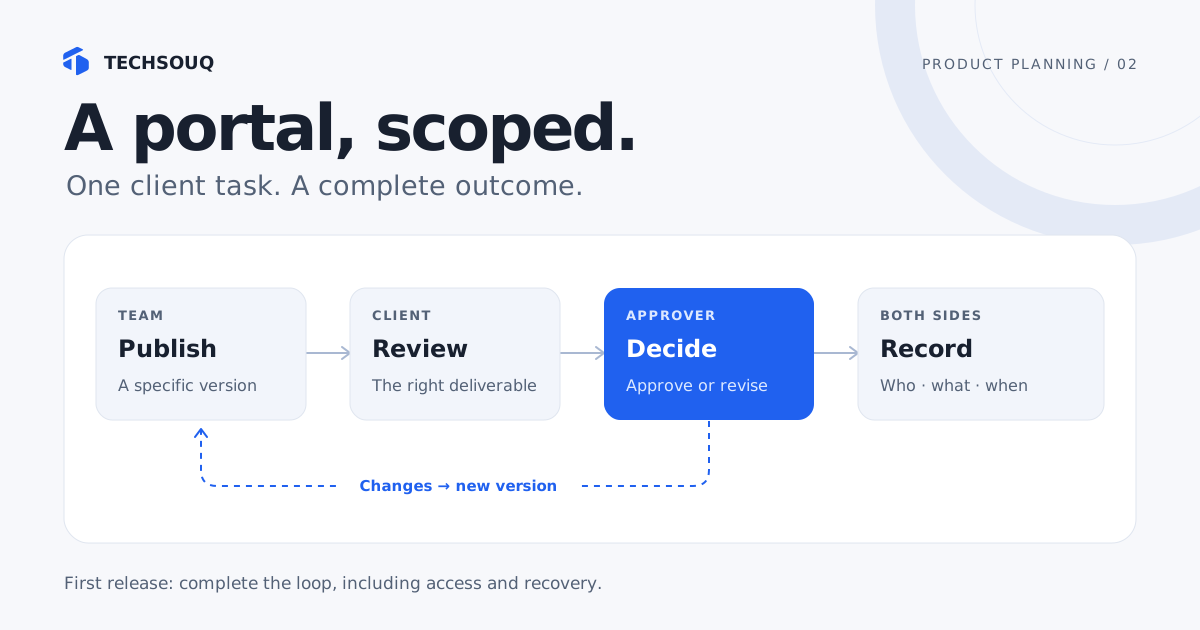
Before collecting prices, it writes down the required outcome: an authorized client can see the correct monthly report, staff can correct a mistake, and the business can export its records. Both proposals must cover that outcome. A cheap platform without the necessary data access is not an equivalent quote.
Use a short acceptance list: which users need access, which systems supply the information, how current the data must be, who handles failures, and how records leave the system. Ask suppliers to demonstrate the difficult case, such as a client with two projects or a report corrected after publication.
This also reveals a third option: keep the purchased platform and build a small integration around the awkward step. The build-versus-buy decision often applies to one part of a workflow rather than the entire business system. GOV.UK’s technology selection guidance emphasizes understanding existing systems, retaining control over data, and preserving the ability to change direction.
A worked example: cheaper overall can still mean more cash
The numbers below are fictional planning assumptions in US dollars. They are not market averages or a Techsouq quote. Assume both options meet the same requirements, run for 36 months, and have the same transaction volume throughout.
| Assumption | Off-the-shelf | Custom software |
|---|---|---|
| Setup, migration, and training | $3,000 | $45,000 |
| Software, hosting, and support per month | $700 | $800 |
| Remaining staff work per month | 40 hours | 5 hours |
| Loaded cost of staff time | $40/hour | $40/hour |
| Exit and data handover allowance | $1,000 | $3,000 |
The purchased product is quick to adopt but still requires report preparation. The custom system automates more preparation but still needs someone to handle exceptions. Its monthly cost includes hosting and ongoing support; the build fee does not make those disappear.
| Result after 36 months | Off-the-shelf | Custom software |
|---|---|---|
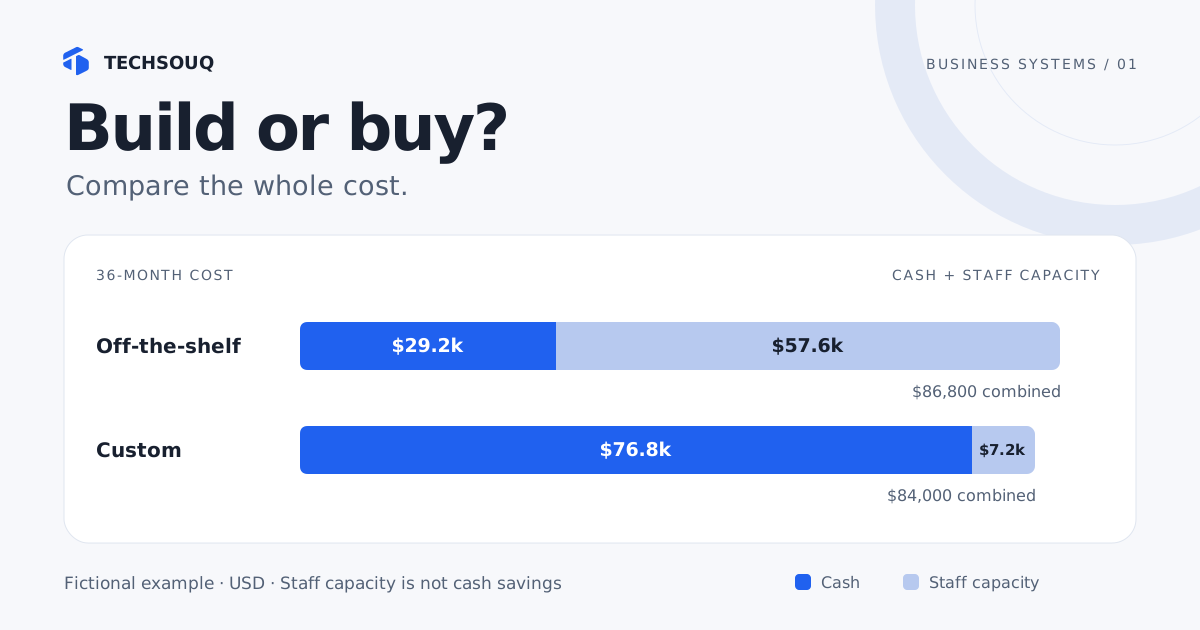
| Cash spending | $29,200 | $76,800 |
| Value of remaining staff time | $57,600 | $7,200 |
| Combined cost | $86,800 | $84,000 |
Custom is only $2,800 lower on the combined measure. It requires $47,600 more cash while releasing 1,260 staff hours over three years. Those statements can all be true at once.
If the same employees remain on the same salaries, the payroll does not automatically fall. The recovered time might improve turnaround, avoid overtime, or allow the team to serve more clients. Those are valuable possibilities, but someone must explain how they become a business benefit.
A business with spare capacity and limited cash might reasonably choose the subscription. A business already turning away profitable work might value the recovered hours differently. The calculator should make that tradeoff visible, not decide it for you.
Calculate your own comparison
Use the same currency and time horizon for both options. Replace every example input with a quote, an observed workload, or a clearly identified estimate. Include recurring support in both columns. To assess a hybrid approach, compare the purchased product with the same product plus an integration.
What does each option really cost?
Compare cash separately from the value you assign to staff time. These starting numbers are a fictional example, not vendor quotes.
Your 36-month comparison
Planning estimate| Measure | SaaS portal | Custom portal |
|---|---|---|
| Cash outlay | USD 29,200 | USD 76,800 |
| Staff hours | 1,440 hrs | 180 hrs |
| Assigned staff-time value | USD 57,600 | USD 7,200 |
| Cash + staff-time value | USD 86,800 | USD 84,000 |
Custom portal needs USD 47,600 more cash than SaaS portal.
It uses 1,260 fewer staff hours. Its cash + staff-time value is USD 2,800 lower.
Released time is capacity, not automatic cash savings. This model keeps recurring costs flat, includes the exit allowance once, and excludes tax, inflation, financing, and any revenue change. Compare with the same currency and horizon.
The model uses three calculations:
- Cash cost: setup cost + monthly running cost × months + exit allowance.
- Staff capacity value: remaining staff hours per month × loaded hourly cost × months.
- Combined cost: cash cost + staff capacity value.
An exit allowance is included once at the end of the comparison. If no exit is planned in that period, set it to zero in both options and assess eventual exit separately. The model keeps prices, workload, and staff rates constant. It excludes tax, inflation, financing, discounting, revenue gains, and unexpected incidents. It also assumes both options are operational from the start; a delivery delay requires a separate transition budget.
For a phased launch, add the months of duplicate subscriptions, temporary manual work, and migration support to your decision document. Do not hide those costs by pretending the custom system is available on the day the contract is signed.
Collect the five numbers that change the decision
1. Full setup cost
Ask what must happen before the first real user succeeds. Include discovery, configuration or development, importing and cleaning existing data, integration setup, testing, training, and the internal time needed to make decisions.
Keep paid supplier work in the cash figure. If you also value internal setup time, record it separately and apply the same treatment to both proposals. Do not count that time twice inside a supplier fee and again as staff cost.
2. The bill when the system is in regular use
Request a monthly figure at your expected number of users and transactions. Check whether access for clients, API usage, storage, premium integrations, and support require additional plans. For custom software, establish who pays for monitoring, backups, dependency updates, and fixes when connected services change.
Microsoft’s cost-model guidance recommends accounting for initial costs and ongoing run costs, with room for unplanned spending. Apply that principle to the whole workflow, not just its hosting bill.
3. Work that still lands on a person’s desk
Observe a representative batch of real cases. Count active handling time: reconciling a missing record, correcting an import, checking the report, and answering “where is my file?” Waiting two days for a client to reply is elapsed time, not two days of staff labor.
Include ordinary exceptions. A demo using one perfectly clean record will not reveal the effort needed when a customer changes their company name, a source system is unavailable, or a report must be withdrawn.
4. A usable staff rate
Use a consistent estimate for the cost of the people doing the work. If several roles are involved, use a weighted average based on their share of handling time. Do not substitute a consultant’s retail billing rate for an employee’s loaded cost merely because it produces a larger saving.
Then name the intended use of the released capacity. “Reduce paid overtime by ten hours a month” is a different claim from “give the account manager more time with customers.” GOV.UK’s benefits measurement guidance distinguishes cashable benefits and recommends comparing forecasts with a measured baseline.
5. A credible way to leave
Ask for an example export, not a verbal assurance that your data is portable. Can you recover documents, identifiers, relationships, and decision history in a usable form? Who transfers accounts and credentials? What needs rebuilding elsewhere?
The same questions apply to custom software. Source code without deployment instructions, accessible infrastructure accounts, or a maintainable handover can create a different kind of dependency. The UK DDaT Playbook includes exit alongside operation and maintenance when considering whole-life cost.
Stress-test the result before trusting it
Return to the example and reduce off-the-shelf manual work from 40 to 20 hours a month. Its combined cost becomes $58,000, while custom remains $84,000. One uncertain assumption reverses the result.
Alternatively, increase custom support from $800 to $1,200 a month. Its combined cost rises to $98,400. A small apparent advantage is not much protection against a mistaken maintenance estimate.
Run three versions: the case supported by today’s evidence, a case with lower workload or adoption, and a case with higher running costs. Save the input assumptions alongside the totals. Where one unknown determines the winner, spend money on resolving that unknown before committing to the whole build. Sensitivity analysis is useful precisely because the first forecast is incomplete, as the service benefits guidance explains.
When each option earns its place
| Option | A good reason to consider it | Evidence to request |
|---|---|---|
| Buy an existing product | Its standard workflow fits and the operating burden is acceptable | A trial using your records and awkward cases |
| Buy and integrate | Most of the product works; a specific handoff creates the waste | A small integration proof with real API access |
| Build a custom system | A distinctive, valuable workflow cannot be supported adequately by the alternatives | A tested scope, an operating budget, and a handover plan |
Cost does not override a missing essential capability. A proposal that cannot enforce client access rules, support the required volume, or export critical records should not win because its spreadsheet total is low. Equally, custom development needs a named owner who can make product decisions after launch.
Before requesting a quote, write a one-page brief with the workflow, current workload, required outcome, existing systems, and the three assumptions you most need to validate. For a portal, use our worked customer portal scope and brief builder. You can also explore Techsouq’s work on custom software and integrations.
Sources and further reading
- GOV.UK: Choosing technology — context, adaptability, and data control.
- Microsoft: Creating a cost model — initial and ongoing costs.
- GOV.UK: Measuring service benefits — baselines, benefits, and sensitivity analysis.
- GOV.UK: Digital, Data and Technology Playbook — whole-life costs and exit planning.
Sources checked on 19 October 2026. The example and calculator model are original illustrations; government guidance is cited for its planning principles, not as a requirement for private businesses.